
With ecommerce examples: when you need to find product pages, when you need to extract product data, and when you need both.
A web crawler discovers pages by following links and records their URLs. A web scraper visits specific pages and extracts structured data from them, such as prices or stock status. In real projects, and especially in ecommerce, the two work as a pair: the crawler finds the products, and the scraper collects the fields you care about.
The terms get mixed up all the time, partly because many tools do both. This guide explains the difference between web crawling and web scraping in plain terms. You will find a side-by-side comparison, how each one works, what a crawl-then-scrape pipeline looks like on an online store, and a table that shows which approach fits common ecommerce tasks.
Web Crawler vs Web Scraper at a Glance
Web crawler | Web scraper | |
|---|---|---|
Main goal | Find pages | Extract data from pages |
Input | One or more starting URLs (seed URLs) | Known page URLs or page templates |
Output | A list of URLs, copies of pages, a map of links | Structured records: CSV, JSON, Excel, a database |
Scope | Broad: a whole site, a section or the web | Narrow: specific fields on specific pages |
Follows links? | Yes, that is its job | Not necessarily |
Typical users | Search engines, SEO teams, archives, AI companies | Pricing, category and marketing teams, analysts, researchers |
Examples | Googlebot, site audit tools, AI crawlers | Price monitoring, catalog collection, review analysis |
Main technical challenge | Navigation: pagination, duplicates, crawl depth | Extraction: changing layouts, dynamic content |
The short version of web crawler vs scraper: crawling answers "which pages exist?", scraping answers "what's on them?"
What Is a Web Crawler?
A web crawler is a program that browses the web automatically, moving from page to page through links. It is also called a spider or a bot. The words describe the same thing: a crawler "crawls" the web the way a spider moves across its web, one thread at a time.
Crawlers are used for different jobs:
Search engines. Googlebot and Bingbot crawl the web to find pages and add them to the search index.
SEO audits. Site audit tools crawl your own website to find broken links, redirects and missing tags.
Archives. Services like the Internet Archive crawl pages to keep historical copies.
AI crawlers. AI companies crawl public pages to collect text for training and answering questions.
Focused crawlers. A crawler limited to one topic or one website, for example to find every product page in an online store.
The result of a crawl is data about pages, not data from them: which URLs exist, how they link to each other, and sometimes a raw copy of each page. Data crawling, in other words, is about finding and fetching sources.
How Do Web Crawlers Work?
Most web crawlers follow the same basic loop:
Start with seed URLs. The crawler gets one or more starting points, such as a homepage or a category page.
Fetch the page. It downloads the HTML, and sometimes renders JavaScript.
Extract the links. It collects every link on the page that matches its rules.
Add new links to a queue. The queue, often called the frontier, removes duplicates and decides which pages to visit next.
Follow the rules. The crawler respects limits on depth and speed, and well-behaved crawlers read a site's robots.txt file to see which paths the owner prefers bots to skip.
The loop repeats until the queue is empty or a limit is reached. Many sites also publish a sitemap.xml file, a ready-made list of their URLs, which lets a crawler skip much of the link-following.
What Is a Web Scraper?
A web scraper takes a specific page, reads its HTML (or renders it, if content loads with JavaScript), finds the elements that hold the data you need, and saves them as structured records. On a product page, that means turning a block of HTML into a row with a product name, price, sale price, stock status and SKU.
The key idea: a scraper does not care how you found the page. It cares where on the page the price is. If you already have the list of URLs, a scraper alone is enough.
We cover the mechanics in more detail, with the full sequence from request to export, in our guide on how ecommerce web scraping works step by step.
Scraping vs Crawling: 6 Key Differences
1. Purpose: discovery vs extraction
Crawling is about discovery. Scraping is about extraction. If your question is "which running shoes does this competitor sell?", you need to crawl the category. If your question is "what do those shoes cost today?", you need to scrape the product pages.
2. Input: seed URLs vs target URLs
A crawler starts from a few entry points and works out the rest on its own. A scraper needs to know which pages to visit. In ecommerce, the crawler's input is usually a store homepage or a category URL; the scraper's input is a list of product pages.
3. Output: URL lists vs structured data
Crawl an online store and you get, for example, 2,400 product URLs. Scrape those URLs and you get a table with 2,400 rows: SKU, title, price, availability, brand, GTIN. A crawler alone does not give you data you can put into a pricing model.
4. Scope: breadth vs depth
Crawling covers breadth: a whole site, a section or many sites. Scraping covers depth: 10 to 20 precise fields on each page, extracted the same way every time.
5. Frequency: when the catalog changes vs when the data changes
You crawl as often as the catalog changes, to pick up new and removed products. You scrape as often as the data changes. A typical setup: crawl a competitor's catalog weekly, scrape prices daily. Crawl vs scrape, in this case, is simply two schedules.
6. What breaks: navigation vs page layout
Crawlers break on navigation: pagination, "Load more" buttons, infinite scroll, and filters that create thousands of duplicate URLs. Scrapers break on layout: when a store redesigns its product template, a scraper often keeps running but returns empty or wrong fields. Bot protection and JavaScript rendering make both harder, which is why stores make scraping harder every year.
How Crawlers and Scrapers Work Together in Ecommerce
In practice, crawling vs scraping is rarely a choice of one or the other. Collecting product data from an online store is a pipeline in which the crawler feeds the scraper.
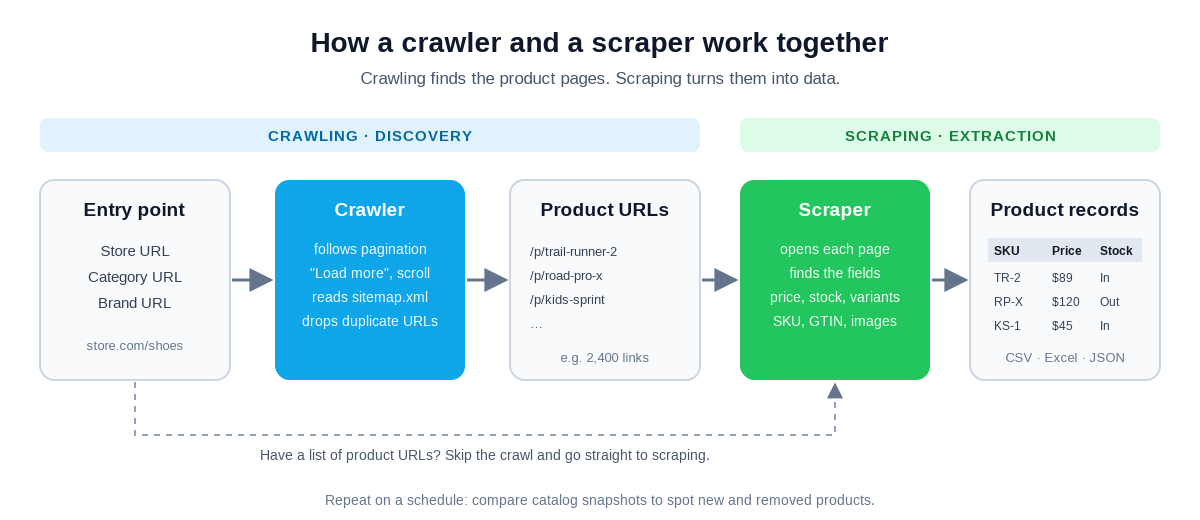
Here is what that pipeline looks like on a single store:
Choose the entry point. Start from the store's homepage to get the full catalog, or from a category or brand page to collect only part of it. Starting from a category is faster and avoids pages you do not need.
Crawl the listings. The ecommerce crawler moves through the category pages: numbered pagination, "Load more" buttons, infinite scroll. Filter and sort options generate duplicate URLs for the same products, so they are removed.
Collect product URLs. Shortcuts help here. A sitemap.xml often lists every product, and some platforms expose a ready product list, such as Shopify's products.json. The output of this step is a clean list of product pages.
Scrape each product page. This is the product data extraction step: the scraper pulls price, regular price, discount, stock status, variants such as size and color, SKU, GTIN or EAN, brand and images.
Normalize and export. Fields from different stores are brought to one format, with the same names, currencies and units, and exported as CSV, Excel or JSON.
Repeat on a schedule. Each new crawl gives you a fresh snapshot of the catalog. Compare it with the previous one to see new and discontinued products; repeated scraping shows how prices and stock change.
A product crawler that stops at step 3 gives you a list of links. A scraper without steps 1–3 needs someone to supply the URLs by hand. Together they turn "this competitor's store" into a dataset. Many tools let you work at the category level, for example with category and brand level scraping, so the crawl is limited to what you need.
After collection, two steps usually remain on the analysis side: comparing snapshots between runs, and product matching, which links a competitor's listing to the same item in your own catalog.
Do You Need a Crawler, a Scraper, or Both?
For most teams, web crawling vs web scraping is not a question of which is better. The answer depends on what you already know. If you have the product URLs, you need a scraper. If you only know the store or the category, you need to crawl first.
Task | What you start with | Crawler | Scraper |
|---|---|---|---|
Track prices of 200 known competitor products (price scraping) | A list of product URLs | — | ✓ |
Get a competitor's full catalog | The store URL | ✓ | ✓ |
Get one category or brand | A category or brand URL | ✓ | ✓ |
Spot new and discontinued products | A store or category URL, crawled regularly, with snapshots compared | ✓ | ✓ |
Monitor stock availability (stock availability tracking) | A list of product URLs or a category | Sometimes | ✓ |
Import a supplier catalog into your store | The supplier's store or category URLs | ✓ | ✓ |
Collect reviews and ratings | Product URLs | Only for review pagination | ✓ |
Audit your own site for SEO | Your domain | ✓ | — |
Most ecommerce data projects end up needing both steps. Competitor price monitoring usually starts with a crawl to build the list of competing products, then runs scraping on a schedule to keep prices current. The SEO audit row is the exception: it is a pure crawling job, and the tools for it are built for a different purpose.
Common Misconceptions
"Crawlers and spiders are different things." They are the same. "Spider" is simply an older name for a web crawler, and both are types of bots.
"Google scrapes the web." Search engines mainly crawl and index. They do read page content to understand it, but their goal is to build a searchable index, not a dataset of prices or specifications.
"A crawler gives you usable data." A crawler gives you pages and links. To get a price, a stock status or a GTIN into a spreadsheet, something still has to extract those fields.
"Web scraping is the same as data mining." Web scraping collects data. Data mining looks for patterns in data you already have. Scraping often comes first, and mining comes later.
Is Web Crawling Legal? robots.txt and Good Behavior
Whether crawling or scraping is lawful depends on the applicable law, the website's terms, the type of data and how it is accessed. There is no single answer that fits every case. A few points apply to both:
robots.txt is not a permission system. The robots.txt file communicates a website's crawling preferences, but it does not grant legal permission to access or reuse content. Ignoring its directives does not automatically determine whether scraping is lawful.
Several legal areas can apply. Legal considerations may include website terms, privacy and data protection laws, copyright, database rights, and restrictions on unauthorized access.
The load on the site matters. Crawling touches far more pages than targeted scraping, so request rates deserve more attention.
The details vary by country and by project. For court cases and a compliance checklist, see our guide is web scraping legal. This is general information, not legal advice.
Types of Crawling and Scraping Tools
Tools differ in how much of the pipeline they cover and how much work they leave to you:
Developer libraries such as Scrapy or Crawlee handle both crawling and scraping, but you write and maintain the code for each site.
SEO crawlers map your own website for technical audits. They are a web crawler in the classic sense, not a data extraction tool.
No-code scrapers let you select fields on a page visually. Many also follow pagination, with limits.
Scraping APIs fetch pages through proxies and handle blocks; parsing the result is usually up to you. See what a scraping API really costs once developer time is included.
Managed services run both steps and deliver finished records on a schedule.
For named products in each category, with prices and limits, see our ecommerce scraping tools compared.
How ShopScraping Handles Both Steps
ShopScraping combines crawling and scraping, so you choose the starting point and get product data back:
Paste a store URL and ShopScraping crawls the whole website to collect the full catalog.
Paste a category or brand URL to collect only that part of the store.
Upload a list of product URLs when you already know which products you need; then only the scraping step runs.
When crawling, ShopScraping follows pagination, "Load more" buttons and infinite scroll, and uses sitemap.xml and Shopify's products.json to find products. Each product page is then scraped into normalized fields that look the same across all your sources. You can run a collection once or on a daily, weekly or monthly schedule, and export to CSV, Excel, JSON, or import-ready Shopify and WooCommerce files.
Each run delivers a complete snapshot of the catalog, so you can compare runs to spot new products, removed items and price changes.
FAQ
- What is the main difference between a web crawler and a web scraper?
A web crawler finds pages by following links and returns a list of URLs. A web scraper extracts specific data, such as prices or stock status, from pages and returns structured records. Crawling is about discovery; scraping is about extraction.
- Is a web spider the same as a web crawler?
Yes. "Spider" and "crawler" are two names for the same kind of program. "Bot" is a broader term that also covers other automated programs.
- Can a web scraper crawl?
Yes. Many scrapers can follow links, pagination and sitemaps, so they crawl first and then extract data. They are two stages of one process. In ShopScraping, for example, a store URL is enough: the crawl and the extraction both run automatically.
- Do I need a crawler to scrape prices?
Not if you already know the product URLs; a scraper can work from a list. You need crawling when you want a whole store or category, or when you want to notice new products as they appear.
- How do I find new products on a competitor's website?
Crawl the competitor's store or category regularly and compare the product lists between runs. Products that appear in the new snapshot but not in the old one are new; products that disappear have been removed or are out of the catalog.
- Is Google a web crawler?
Google uses a web crawler called Googlebot to find and fetch pages for its search index. Google Search itself is the search engine built on top of that crawl.
- What is the difference between data crawling and data scraping?
Data crawling means finding and fetching sources, such as all the pages of a website. Data scraping means extracting specific fields from those sources and turning them into structured data.
Try It on a Competitor's Store
Have a competitor in mind? Paste their store or category URL into a free demo and see which products and fields ShopScraping finds. When you are ready, start collecting data from $20 a month.