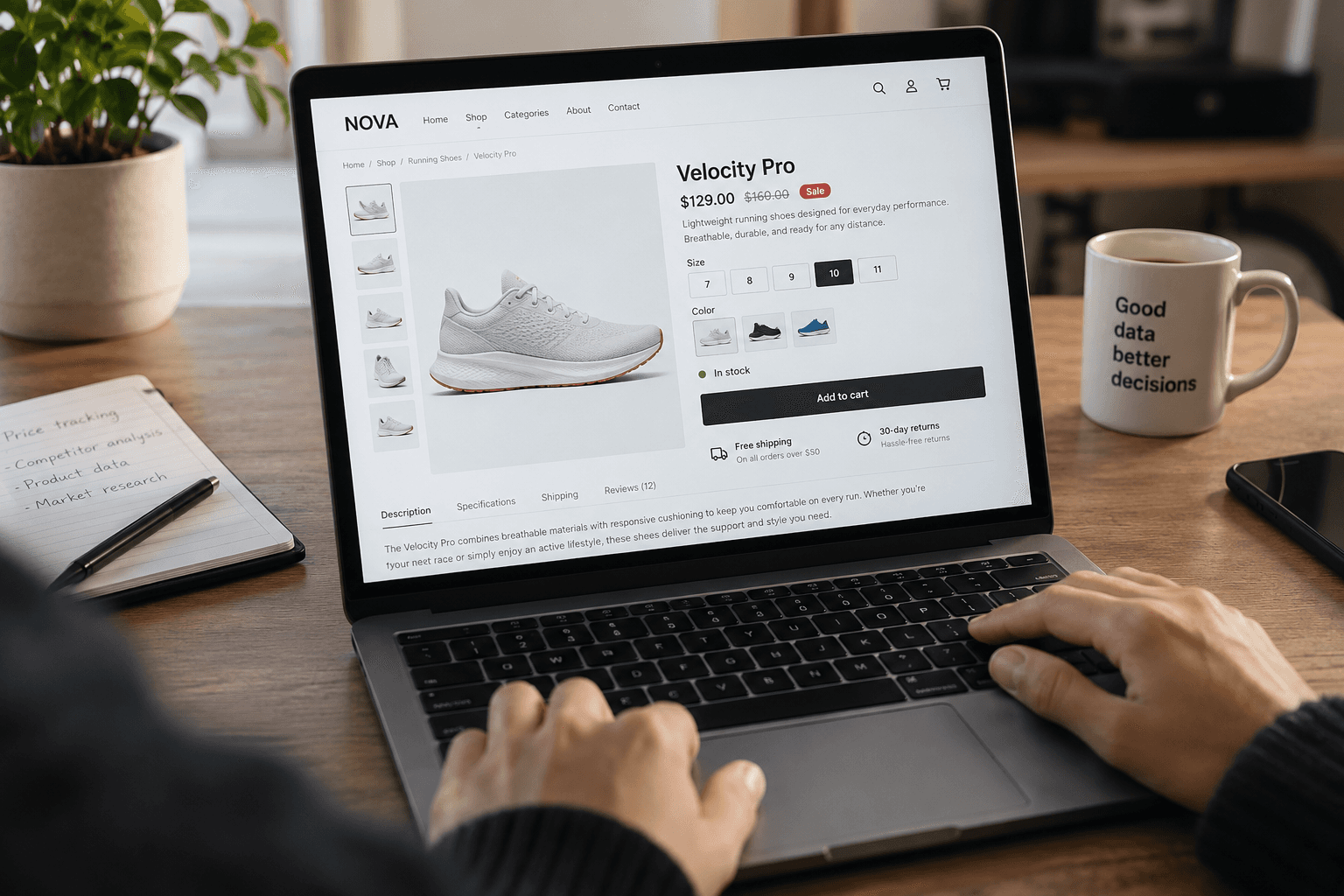

Product data runs modern e-commerce. Retailers track competitor prices, analysts study assortments, marketers enrich catalogs, and pricing teams watch stock levels across dozens of stores. Until recently, getting that data meant one of two things: hours of manual copy-paste or hiring a developer to build a Python scraper — and then paying them again every time a website changed its layout.
That's no longer the case. Today you can scrape product data without coding at all. No-code web scraping tools let anyone — a category manager, a marketer, an analyst — extract prices, availability, SKUs, descriptions, and images from almost any online store and export them straight to Excel, CSV, or JSON in minutes.
This guide explains how no-code product scraping works, who it's for, and how to set up your first extraction in three simple steps.
What Is Product Data Scraping? (And Why You Don't Need Code Anymore)
Product data scraping is the automated extraction of structured information from e-commerce websites. Instead of a person opening product pages one by one, a scraper visits them automatically, identifies the relevant fields, and saves everything into a clean, consistent dataset.
What product data you can extract
A modern product scraper can pull far more than just prices — a full product data extraction run returns 30+ fields per item. The most commonly used ones:
Pricing data — current prices, old prices, discounts, and promotional offers
Stock and availability — in-stock, out-of-stock, and low-stock status
Product information — titles, descriptions, categories, and variants
Product identifiers — SKU, EAN, UPC, and MPN codes for matching items across stores
Reviews and ratings — review counts and average scores to gauge product popularity
Product images — primary and gallery images for catalog import or variant mapping
Because the output is normalized into a consistent structure, it's ready for analytics, pricing tools, or direct import into your own catalog.
Manual copy-paste vs coded scrapers vs no-code tools
There are three ways to collect product data, and they differ dramatically in cost and effort:
Manual copy-paste | Custom coded scraper | No-code scraping tool | |
|---|---|---|---|
Technical skills | None | Python/JS developer required | None |
Setup time | Immediate, but slow per item | Days to weeks | Minutes |
Scale | Dozens of products | Thousands+ | Thousands+ |
Maintenance | N/A | Breaks when sites change | Adapts automatically |
Anti-blocking | N/A | You build it yourself | Built in |
Best for | One-off checks of a few items | Teams with engineering resources | Everyone else |
Manual collection doesn't scale past a handful of products. Custom scrapers scale well but come with an ongoing engineering cost — every site redesign is a potential outage. No-code tools sit in the sweet spot: the scale of automation without the maintenance burden.
Who Needs No-Code Product Scraping (Real Use Cases)
No-code scraping isn't a niche developer trick — it solves everyday problems across e-commerce teams.
Competitor price monitoring
The most common use case. Retailers scrape competitor stores on a daily or weekly schedule to track prices, discounts, and promotions, then adjust their own pricing strategy accordingly. Because no-code tools don't require APIs or partnerships, you can monitor competitor prices without any integrations — a public product page is all you need.
Stock and availability tracking
Knowing when a competitor runs out of a bestseller is a pricing opportunity. Scheduled scrapes let you track product stock and availability across competitor stores and react in near real time — raising prices when competitors are out of stock, or securing inventory when demand spikes.
Catalog enrichment for Shopify and WooCommerce stores
Store owners use scraping to build and enrich their own catalogs: pulling supplier product descriptions, specifications, and images, then importing them as ready-made feeds into Shopify or WooCommerce. What used to take a content team weeks now takes an afternoon.
Market research and assortment analysis
Before entering a new category or market, analysts scrape entire category listings to understand assortment depth, price ranges, review volumes, and which products dominate. Matching items across stores by SKU or EAN makes cross-retailer comparison straightforward.
How to Scrape Product Data Without Coding: 3 Simple Steps
Here's the entire workflow with a no-code product data extraction tool like ShopScraping. No APIs, no configuration files, no scripts.
Step 1 — Paste the store URL
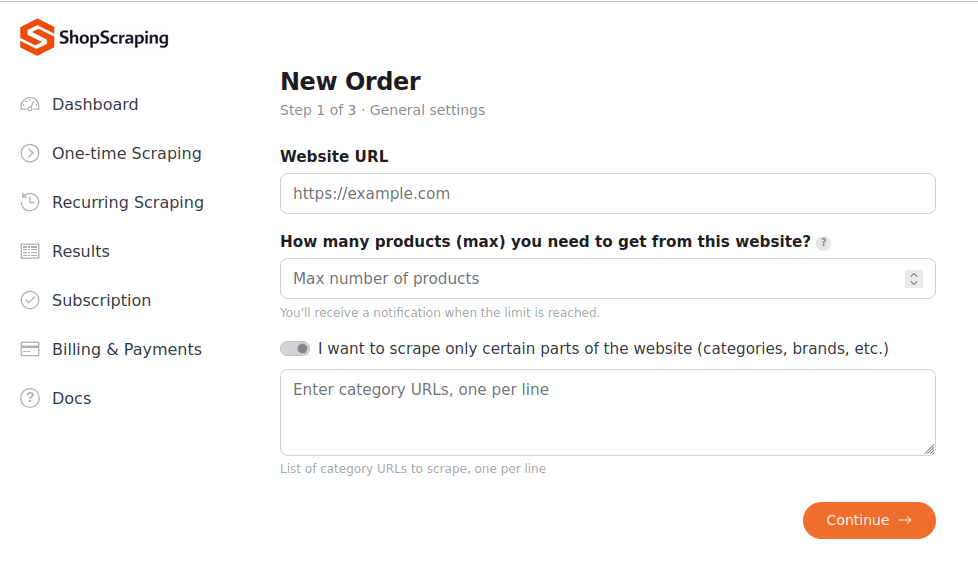
Copy the address of a product page or a category listing and paste it into the tool. The scraper works with almost any e-commerce platform — Shopify, WooCommerce, Magento, large marketplaces, or fully custom-built stores. AI-powered extraction automatically identifies the page structure, so there's nothing to configure.
Step 2 — Select the attributes you need
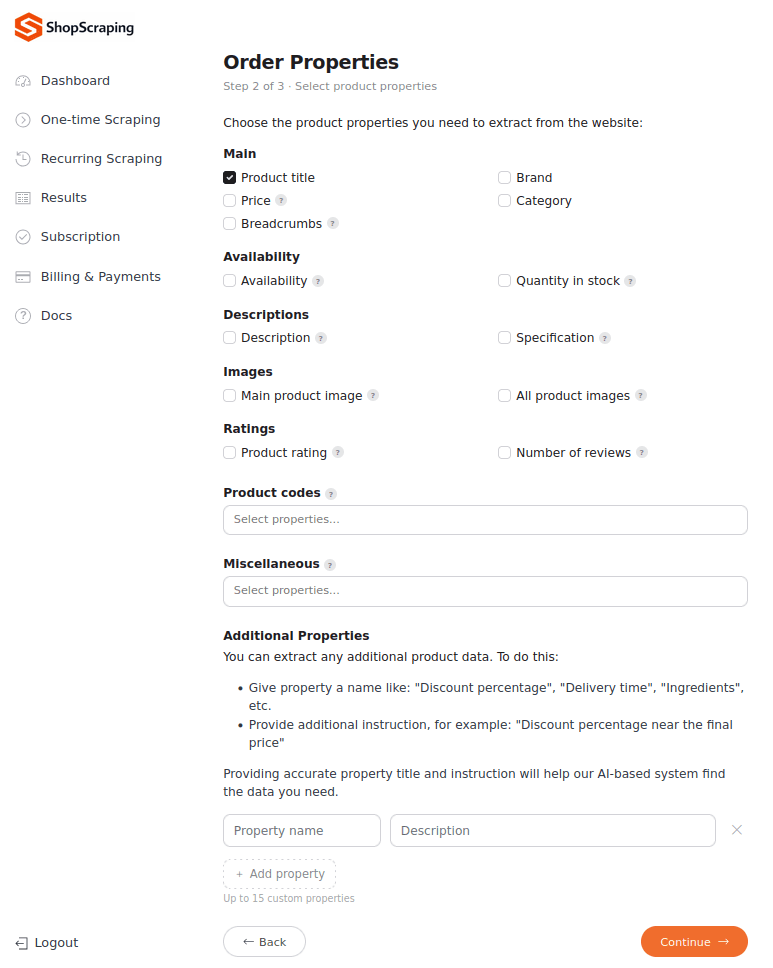
Choose which fields to extract: prices, availability, titles, descriptions, images, specifications, review counts, or custom attributes like delivery options and promotions. You only get the columns you actually need — no cleanup afterward.
Step 3 — Download your data in CSV, Excel, or JSON
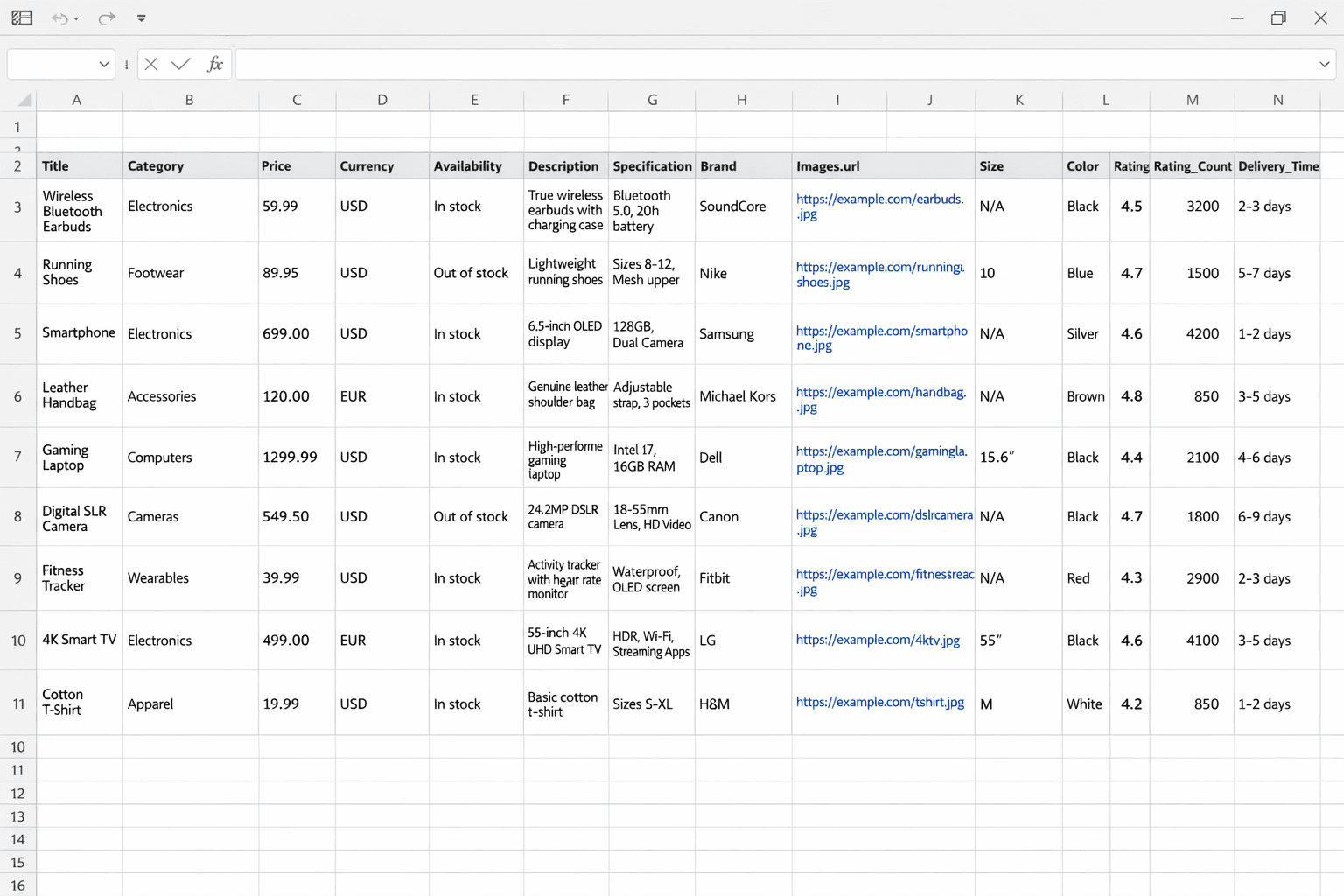
Run the extraction and download the results in the format that fits your workflow: CSV for quick analysis, Excel (XLSX) for reporting, or JSON for feeding into internal systems. Every record passes automated validation, so anomalies and inconsistencies are filtered out before the data reaches you. Ready-to-import feeds for Shopify and WooCommerce are also available.
Bonus — Schedule recurring scrapes for automatic updates
For price and stock monitoring, one-time data gets stale fast. Set the scraper to run daily, weekly, or monthly, and your dataset refreshes itself — no manual work, no reminders, no gaps in your price history.
See ShopScraping in Action
Drop in a store URL and get structured product data — right here, in seconds.
What About Building Your Own Scraper?
If you have engineering resources, writing a custom scraper is always an option — but it's a commitment, not a one-off task. Beyond the initial build, you own the infrastructure, the anti-blocking setup, and the ongoing maintenance every time a target site changes its layout. Rule of thumb: build if scraping is your product; go no-code if scraped data merely feeds your decisions. We've broken down the full economics of that choice in our build vs buy guide.
Common Challenges (and How No-Code Tools Solve Them)
Even without writing code, scraping has real technical obstacles. Here's how mature no-code platforms handle them.
Websites change their layout
The classic scraper killer: a store redesigns its product page and every selector breaks. AI-powered extraction solves this by understanding what a field is (a price, a title, an availability badge) rather than where it sits in the HTML. When the structure changes, the scraper detects it and adapts automatically — your pipeline keeps running.
Getting blocked
Large stores actively defend against automated traffic with rate limits, CAPTCHAs, and bot detection. Built-in anti-blocking mechanisms — rotating requests, realistic browsing behavior, and adaptive retry logic — keep data collection stable without gaps or failed runs. This is exactly the infrastructure that's expensive to build and maintain in-house.
Messy, inconsistent data
Raw scraped data is rarely clean: prices come with currency symbols in different formats, availability is worded differently on every site, and duplicates creep in. Automated validation and normalization check every extracted record for errors and inconsistencies, so what lands in your spreadsheet is analysis-ready — not a cleanup project.
A Quick Note on Legality
Collecting publicly available product data — the prices, titles, and availability any visitor can see — is broadly considered legitimate, provided you scrape responsibly and steer clear of personal data. The nuances (regional rules, court precedents, best practices) deserve their own deep dive, and we've written one: Is Web Scraping Legal? A 2026 Guide for E-commerce.
FAQ: Scraping Product Data Without Coding
Can I scrape Amazon or other large marketplaces without coding?
In many cases, yes. No-code tools handle most publicly accessible stores, including major marketplaces. Large platforms do use advanced anti-bot protection, which makes extraction more complex — that's where tailored technical approaches on the tool's side come in, so reliability depends on the specific site rather than on your skills.
Do no-code scrapers work on JavaScript-heavy websites?
Yes. Modern e-commerce storefronts render prices, availability, and variants dynamically with JavaScript, which breaks simple parsers. No-code platforms load pages the way a real browser does, so dynamically rendered content is captured just like static content.
How is a no-code scraper different from a browser extension?
Browser extensions run on your machine: you keep the tab open, click through pages yourself, and re-configure selectors when a site changes. A no-code scraping platform runs in the cloud — it crawls entire catalogs on a schedule, adapts to layout changes automatically, and handles anti-blocking for you.
How many products can I scrape at once?
There's no practical page-by-page limit the way there is with manual collection or extensions. You can extract a single product page, a full category, or an entire catalog with thousands of items in one run — the data arrives as one structured dataset.
Can I get scraped product data into Google Sheets?
Yes — export the results as CSV or Excel and import the file into Google Sheets, or use API delivery to feed a sheet automatically. For recurring monitoring, a scheduled scrape plus automated import keeps your sheet up to date without manual work.
Start Scraping Product Data in Minutes
Scraping product data used to be a developer's job. Now it's a three-step process anyone can run: paste a URL, pick your fields, download clean data. Whether you're monitoring competitor prices, tracking stock, enriching a catalog, or researching a new market, no-code scraping gets you from "I need this data" to a ready-to-use spreadsheet in minutes — without writing a single line of code.
Ready to try it? Start collecting product data with ShopScraping — no coding, no setup, no manual work.